Anime Screen Pets: Shimeji
- 4.7
- Rating
- 500.00K
- Installs
- Free
- Price
 Analysis by App-foxy
I tried Anime Screen Pets: Shimeji as a small personalization app rather than as a game I needed to sit down and play. That distinction matters. Its appeal is the way cute anime-style pets occupy the phone screen, moving around while I use the device for other things. Instead of replacing my wallpaper or turning the whole interface into a theme, it adds a little animated company to the everyday screen.
That makes it an easy app to understand, but not necessarily one that everyone will enjoy for long. I found the idea charming when I wanted my phone to feel less static, especially during routine moments such as reading messages, checking a shopping list, or waiting for a download. At the same time, a live character on the screen can become visual clutter if I am trying to concentrate. My overall view is positive, with the important qualification that this is a decorative companion, not a productivity tool or a deep interactive game.
How the current version feels in daily use
The current release is version 1.0.1, and the app comes from Smart Apps Publishing Global. It is listed as a free personalization app for users aged Everyone, with support beginning at Android 7.0. Those details make it approachable for people who want to experiment without committing money or using a recent flagship phone simply to try a playful screen effect.
You May Also Like

 Blood Strike: 2.5 Anniversary
Blood Strike’s Loadouts Turn Every Drop Into a Tactical Gamble
A close look at Blood Strike’s custom loadouts: how fast access to signature weapons reshapes its battle royale rhythm, rewards preparation, and narrows the gap between fights.

 Pandora - Music & Podcasts
Pandora’s Music Is Easy to Start, but Harder to Recover
Pandora’s strength is its low-effort path from a seed to a station. Its weak spot is how much confidence it asks you to place in connection, setup, and quiet recovery.

 8 Ball Pool
 Is Built on Rivalries, Rematches, and Routine
A close look at the rivalries, rematches, shared routines, and unanswered safety questions that turn a quick pool match into a persistent mobile community.

 Samsung Music
’s Quiet Strength Is Playing What You Already Own
Its reach comes less from spectacle than from dependable access to a personal library. That simplicity is both the app’s strongest retention engine and its ceiling.

 AccuWeather: Weather Radar
AccuWeather Review: A Quick, Clear Forecast for Everyday Decisions
For everyday plans, the best forecast is the one you can understand quickly. AccuWeather makes rain timing, radar, and local conditions easy to act on, with a few trade-offs.

 Hill Climb Racing
Why Hill Climb Racing Still Turns Crashes Into One More Run
A tiny car, a bumpy hill and one more upgrade: Hill Climb Racing keeps resurfacing because its simple chaos makes every near-miss feel personal.
More From Our News Desk



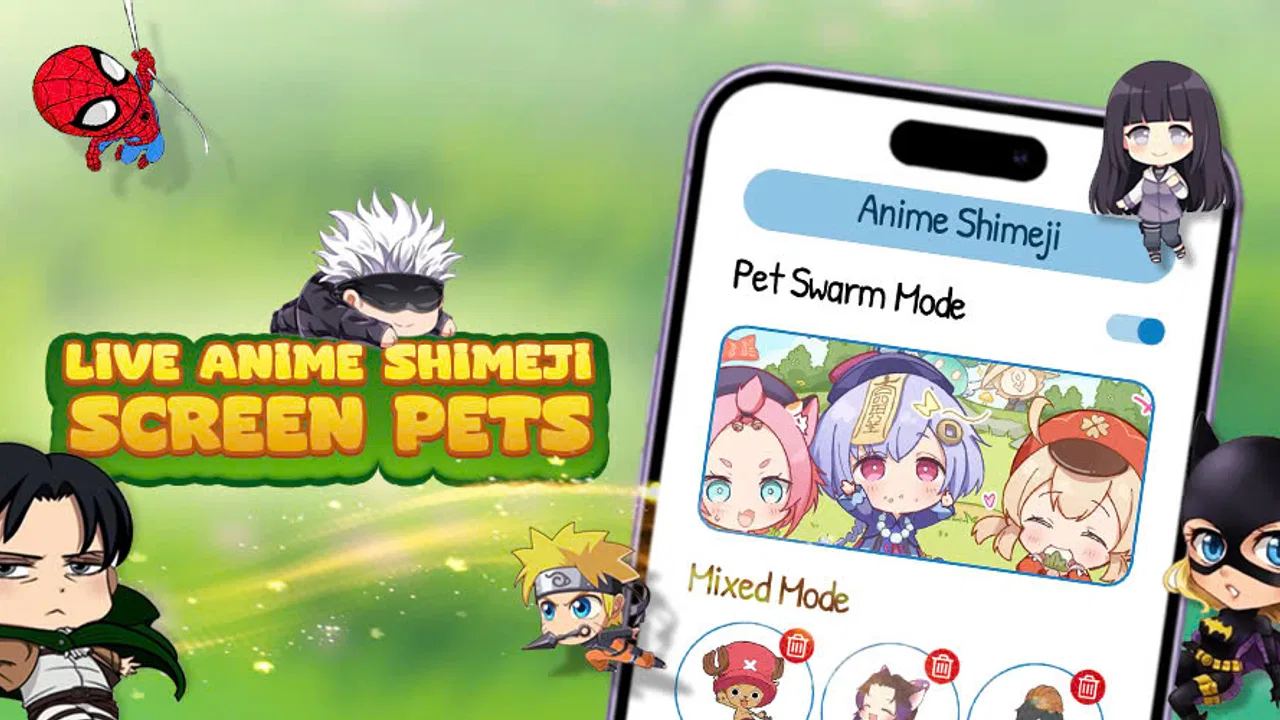
The central experience is deliberately lightweight: anime pets run, jump, and interact live on the phone screen. I like that the idea does not ask me to abandon the normal Android interface. The pets are an extra layer of personality, so I can still use the phone for ordinary tasks while they provide movement in the background. The result feels closer to a digital desk ornament than to a conventional game.
That framing also explains the app's strongest use case. If you enjoy animated characters, virtual companions, or expressive phone customization, the live movement gives your device more character than a still wallpaper can. A wallpaper changes the background; these pets make the screen feel active. The difference is small in practical terms, but noticeable emotionally.
I would not install it expecting a story, missions, competitive progress, or a long-term challenge loop. The pleasure comes from seeing the characters appear and behave while I do something else. That can be surprisingly pleasant for short sessions, but it also means the app has to earn its place through atmosphere. If the novelty of moving anime pets does not appeal to you, there is not much else here to compensate.
A realistic everyday scenario
Imagine checking your phone during a short break. You open a message, glance at a calendar reminder, and return to the home screen. With this app active, the screen is not simply waiting for the next tap; the pets continue to move around it. I found that especially fitting during low-pressure moments, such as listening to music, waiting for public transport, or taking a brief pause between chores.
There is also a useful emotional angle. A static phone can feel purely functional, while a tiny animated character can make it feel more personal. I would recommend trying the app when you want a cheerful visual touch but do not want to redesign every icon or replace the entire launcher. It is a lower-effort form of customization than rebuilding the home screen from scratch.
However, I would switch it off before reading something demanding or working with a crowded interface. Movement at the edge of the screen can pull my attention away, even when I am not actively watching it. This is the first practical trade-off: the same animation that makes the phone feel lively can make it less calm.
What the early release gets right
The most successful part of the experience is the immediacy of the concept. There is no complicated explanation needed to understand why the app exists. Once the pets are visible and moving, the purpose is clear. That simplicity is valuable for casual users, younger users, and anyone who wants a quick personalization experiment rather than a lengthy setup project.
I also appreciate the separation between decoration and ordinary phone use. The app does not ask me to spend every minute inside a dedicated screen. Its appeal comes from the way it accompanies other activities. That makes it more flexible than a traditional character game, where the user has to keep returning to the game itself to see progress.
Another strength is that the free price lowers the risk of trying it. For a visual novelty, that is important. I can test whether animated screen pets suit my habits without treating the decision like a major purchase. The app has attracted over fifty thousand installs and holds a 4.9 average from around four hundred ratings, which suggests that its basic charm connects strongly with the people who choose to rate it. I still treat those figures as a sign of appeal rather than proof that it will fit every phone or personality.
The age classification of Everyone also makes the concept easy to share within a household. Parents looking for a playful personalization option may find it more approachable than an app built around mature themes. I would still make the final decision based on the individual user's tolerance for animated distractions, because an age rating does not tell me whether the visual style will suit a particular routine.
How the version and release timing shape expectations
The app was released on January 29, 2026, so version 1.0.1 should be viewed as an early stage rather than a mature platform with a long-established history. I see that as both an opportunity and a limitation. The foundation is clear and attractive, but early releases often need time to refine the small details that determine whether an app becomes a daily favorite or a short-lived curiosity.
For someone installing it now, the sensible approach is to judge the current experience on its own terms. The live pets already provide the main reason to use the app, but I would not assume that future updates will automatically add particular characters, controls, or systems. Those are possibilities, not promises. What matters today is whether the existing screen animation makes your phone more enjoyable without becoming an annoyance.
Existing users should also think about what they value most. If the main benefit is the feeling of having a lively screen, a small update can preserve that appeal even without changing the concept. If you are waiting for a much broader customization system, deeper interaction, or more control over how the pets behave, the current early version may feel more like a starting point than a finished destination.
I find this distinction useful because it prevents disappointment. The release is not trying to compete with a full launcher replacement or a large character-collection game. It is a focused personalization experience. Its success depends on doing that one thing pleasantly, not on matching every feature found in unrelated categories.
Practical ways to decide whether it belongs on your phone
My first tip is to test it during a normal day rather than judging it only during the first exciting minute. Early novelty can make almost any animated customization feel wonderful. After a few routine checks, ask whether the pets still add warmth or whether you automatically look past them. That answer tells you more than the initial reaction.
My second tip is to match the app to the right home-screen layout. A simple, uncluttered screen gives the characters room to be noticed without competing with a dense collection of widgets and icons. On a busy layout, the pets may feel visually lost in one moment and distracting in the next. The app's decorative effect depends partly on how much visual breathing space the rest of the phone has.
A third useful habit is to treat it as a mood-based tool. I would use the pets when I want a playful atmosphere and disable or pause the experience when I need a quiet, focused screen. That flexible mindset works better than expecting one setting to suit every activity. Personalization does not have to be permanent to be worthwhile.
I would also consider who else uses the device. A child may enjoy seeing anime pets move around, while an adult sharing the phone for work may prefer a cleaner display. Because the app is free and aimed at Everyone, it is easy to try, but the most suitable choice may still be to keep it for a personal device rather than a shared one.
Where it differs from ordinary alternatives
The usual alternatives in personalization are static wallpapers, icon packs, widgets, launchers, and lock-screen themes. Those options mainly change appearance. Anime Screen Pets: Shimeji adds motion and a sense of presence, which is its clearest point of difference. I would choose it over a wallpaper when I want the screen to feel animated rather than simply decorated.
A launcher is the better choice if I want to reorganize navigation, change icon behavior, or control the whole layout. An icon pack is better when consistency matters more than movement. A widget is more useful when I want information such as weather, tasks, or appointments. This app does not replace those tools; it occupies a narrower but more playful space beside them.
It also differs from a conventional anime game. A game normally rewards focused attention with levels, goals, or decisions. Here, the pets are meant to accompany me while I do something else. That makes the app less demanding, but also less substantial. If you want a reason to return and actively play, a dedicated game will probably offer more depth. If you want a character-like presence without another activity to manage, this is the more suitable direction.
Limitations I noticed before recommending it
The biggest limitation is the same feature that defines the app: live movement. Animation can make a phone feel cheerful, but it can also compete with text, icons, and notifications. I would be cautious about using it on a work-focused phone, during study, or anywhere a calm display is important. The app is best when the screen is a place for personality, not when every visual element needs to stay quiet.
There is also a risk of novelty fading. A live pet is immediately noticeable, but personalization apps often depend on continued affection rather than measurable progress. If you need unlocks, objectives, or a strong reason to return, this format may feel limited after the first few days. I would not count that as a flaw in the concept, but it is a real reason some users will uninstall it.
The early version is another consideration. Version 1.0.1 communicates that the product is still young. I would expect the most important evaluation to be whether the current behavior feels stable and pleasant on your own device, not whether it already matches the breadth of older personalization platforms. Because Android devices differ widely, my advice is to try it briefly and observe how well the visual layer fits your normal screen habits.
Finally, people who prefer minimal interfaces should probably skip it. A clean wallpaper, a restrained icon pack, or no decorative layer at all will be more satisfying for that audience. This app is intentionally expressive. Its value lies in adding something extra, so users who see anything extra as clutter are starting from the wrong end of the category.
Who should install it, and what to watch next
I recommend giving it a try if you enjoy anime-inspired design, want a more animated home screen, or like the idea of a small virtual companion that does not demand constant attention. It is especially appealing for casual personalization because it is free, easy to understand, and focused on a visual effect rather than a complicated system.
I would skip it if your priority is productivity, deep customization, or a structured game. A launcher, widget-focused setup, static theme, or dedicated anime game would serve those goals better. Choosing the alternative is not a criticism of this app; it simply reflects a different need. The right question is whether you want your phone to feel more alive, not whether you want to transform how the phone works.
For future updates, I would watch how Smart Apps Publishing Global develops the early foundation. The most meaningful improvements would be the ones that make the pets easier to live with over time: thoughtful control over their presence, smoother integration with different screen layouts, and enough variety to keep the experience from feeling repetitive. I am deliberately treating those as things to watch, not as features already guaranteed.
My final recommendation is favorable but specific. Anime Screen Pets: Shimeji succeeds as a cheerful layer of personalization, and its current release makes a strong first impression because the idea is instantly visible. I would install it for atmosphere, keep it available for relaxed moments, and turn it off when focus matters. If you want your Android screen to feel less static without replacing the whole interface, this is a charming experiment worth trying.
Its best quality is also its boundary: it adds personality rather than depth. Once I understood that, the app made sense. I stopped expecting a full game or a complete customization suite and started appreciating it as a small animated companion. For the right user, that modest role is exactly why it works.
FAQs for Anime Screen Pets: Shimeji
01What is Anime Screen Pets: Shimeji?
Anime Screen Pets: Shimeji is an interactive app that brings adorable anime characters to life on your device's screen. These virtual pets interact with users by performing a variety of actions, such as walking, climbing, and even responding to touch. They add a playful and personalized element to any Android or iOS device.
02Is Anime Screen Pets: Shimeji free to download and use?
The app is available for free download on both Android and iOS platforms. However, it may offer in-app purchases for additional features or pets. Users can enjoy a variety of characters for free, but some exclusive content might require payment, offering a more enhanced experience.
03How do I customize my Shimeji pets?
Customization is one of the key features of Anime Screen Pets: Shimeji. Users can select different characters, change their behaviors, and even adjust their sizes. The app provides a user-friendly interface to make these changes, allowing you to personalize how your Shimeji interact with your screen.
04Will Anime Screen Pets: Shimeji affect my device's performance?
The app is designed to be lightweight and should not significantly impact your device's performance. However, having multiple pets active at once might use more resources. It's recommended to monitor your device's performance when using the app, especially on older or less powerful devices.
05Are there any privacy concerns with Anime Screen Pets: Shimeji?
Anime Screen Pets: Shimeji requests permission to overlay on your screen, which is necessary for the pets to function. The app does not collect personal data without consent. It's always good practice to review the app's privacy policy to understand what data is collected and how it's used.
Pros
- Interactive and customizable anime characters.
- Low resource usage
- runs smoothly on devices.
- Enhances the home screen with vibrant animations.
- Regular updates with new characters.
- Easy to set up and personalize.
Cons
- Limited free character options available.
- Ads can be intrusive at times.
- Occasional bugs in character animations.
- Some features require in-app purchases.
- Compatibility issues on older devices.

Anime Screen Pets: Shimeji
Gallery